Debloating our Philips OLED TV, then building a family arcade
A weekend with Wi-Fi ADB and an AI coding agent: a cleaner TV, a custom Ambilight home screen at 7 ms per frame, and LEGO Mario as a game controller.
Last month I turned an old Fire tablet into a talking Halloween pumpkin. This weekend I looked at the living room TV with the same question: why does good hardware feel so cluttered, and how far can you push it in a weekend?
We have a Philips OLED Google TV with Ambilight. The panel is brilliant. The software on top of it was not. Menus stuttered, sponsored movie rows filled the home screen before you could reach Apple TV or a console, and switching inputs felt slower than it should.
I had just read Prince Jain's walkthrough on debloating an Android TV over Wi-Fi ADB and building a custom launcher with an AI coding agent. No root, no USB cable, fully reversible. That was enough to open a terminal on Saturday morning.
Forty-eight hours later the TV was clean. It ran a custom family launcher built around Ambilight, hosted webcam motion games partly narrated by a cloned version of my own voice, and took steering input from the kids' LEGO Super Mario and LEGO Peach figures over Bluetooth.
Step 1: Finding out why the TV felt slow
Connecting over Android 14 Wireless Debugging took five minutes. The first memory dump explained the stutter: the TV has 2.8 GB of RAM and 4.9 GB of usable storage, and it sat at 99% zRAM swap before we had opened a single app.
Usage stats showed over a thousand hours on HDMI inputs. Meanwhile dozens of streaming apps we had never opened sat resident in memory, next to Samba TV ad tracking, Alexa, retail demo packages and vendor debug loggers.
With pm disable-user --user 0 I disabled 36 unused system packages. I uninstalled 8 preinstalled streaming apps, which freed about 800 MB of flash, and turned on AdGuard Private DNS at OS level for ad blocking that costs no RAM. The whole undo lives in a single restore_tv.sh script. System crashes since: zero.
A few Philips-specific lessons if you try this:
- Never disable
org.droidtv.eum. It can break the remote's input menu. - Never run
pm clearon packages that shareandroid.uid.system. - Avoid Accessibility Services for launcher overrides. On Philips firmware, enabling one makes the Quick Settings drawer swallow OK presses in the HDR and picture menus.
Step 2: Replacing the home screen with Børvan Hjem
With the bloat gone, I wanted something that felt like our house rather than an ad billboard.
Instead of a Gradle project I built a 1 MB native Android TV APK with a two-second CLI pipeline (aapt2, javac, d8, apksigner). It wraps a hardware-accelerated WebView and a small Java bridge to Android's TvInputManager, PackageManager and Norwegian text-to-speech.
The design is built around two things we love about this TV: true OLED black and Ambilight.
- Reactive Ambilight edges: each focused card changes the colour at the screen's edge, and with it the wall behind the TV. Apple TV glows icy winter blue, Xbox Series X turns the wall emerald green, and Nintendo Switch 2 splits the room into neon red on the left and cyan on the right.
- One-click HDMI switching: Apple TV (HDMI 3), Xbox Series X (HDMI 1) and Switch 2 (HDMI 2) sit first in the row, with live HDMI-CEC status.
- Local Norwegian touches: live Yr weather for Ski (
api.met.no) with clothing tips for the kids, NRK headlines from RSS in a clean 10-foot reader with Norwegian read-aloud, a 24-door family Julekalender for Advent, and a one-button Peiskos mode with a cabin fireplace, floating embers and synthesised crackling. - OLED burn-in care: a pure black centre, a subtle pixel drift every two minutes and automatic idle dimming.
The first build looked good but felt sluggish. dumpsys gfxinfo showed 100% janky frames at an 81 ms median: backdrop-filter: blur() on 20 cards over an animated snow canvas was choking the TV's MediaTek GPU.
The fixes were unglamorous. I dropped live blur, scoped the Ambilight CSS variables off :root, downscaled the ambient canvases to 640×360, paused the snow for 360 ms on every remote key press, and AOT-compiled the app with cmd package compile. Median frame time fell from 81 ms to 7 ms, and jank from 100% to 2.99%.
Once it felt right, I set Børvan Hjem as the default Home launcher. On Android 14 Google TV that means disabling launcherx first, because it holds priority=2 over the HOME role.
Step 3: Webcams, an iPhone and LEGO over Bluetooth
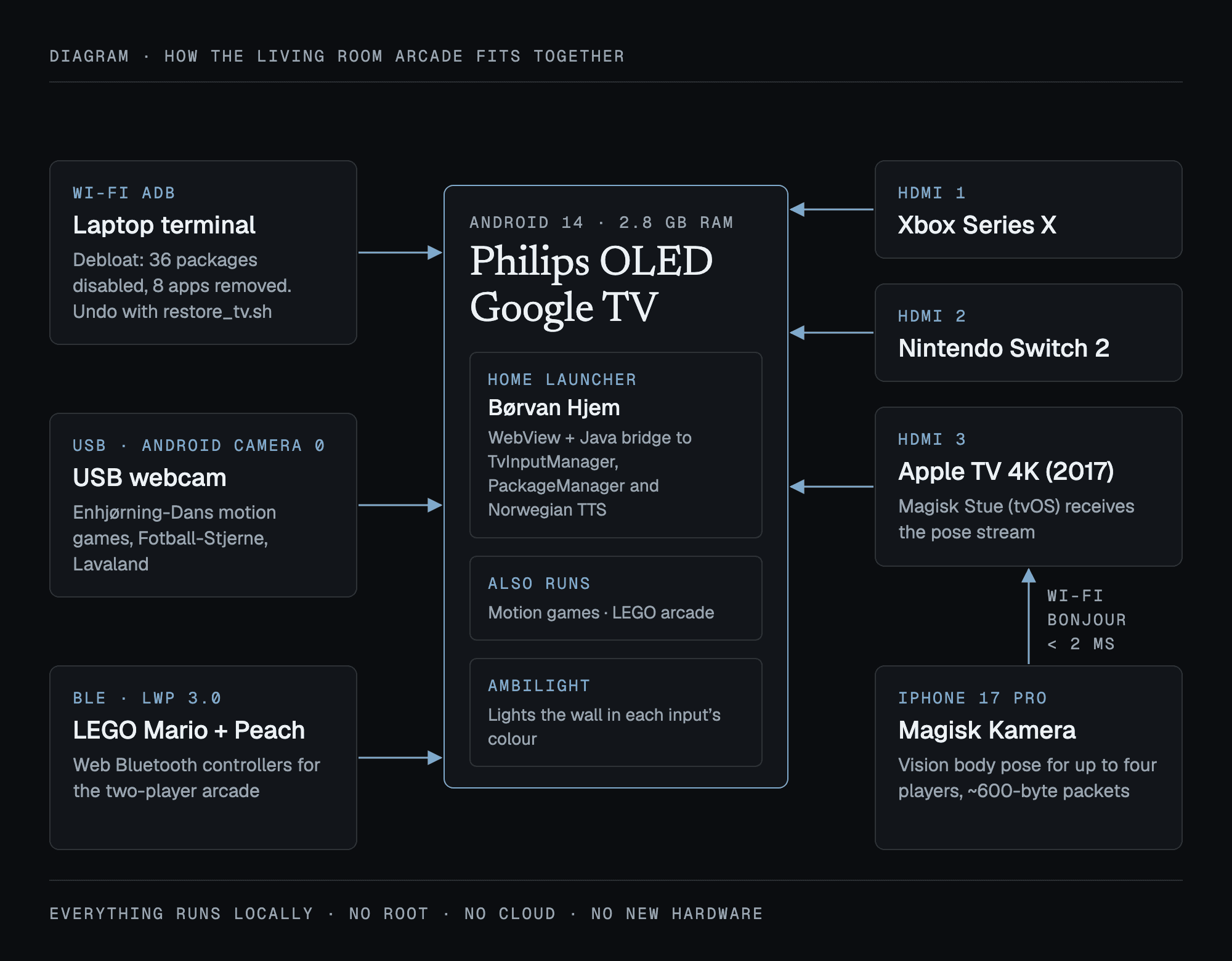
While auditing the TV I noticed that a standard USB webcam plugged into it showed up as Android Camera 0. That started a second track, for the kids.
Webcam games on the TV. We built Enhjørning-Dans, five bilingual Norwegian and English motion games (Freeze Dance, Rainbow Bubbles, Magic Paint, Touch the Word, and Jump & Duck), plus Fotball-Stjerne and an upgraded Lavaland ("the floor is lava"). Ambilight's flashing walls kept fooling the motion detector, so the tracker now subtracts the global brightness shift between frames before it measures movement. The voices are 142 offline ElevenLabs clips: Oslo Norwegian, playful English, and a cloned version of my own voice for celebrations.
Apple TV and iPhone body tracking. Pixel-diff tracking on a webcam hits a ceiling quickly. It cannot separate two to four players, attach AR unicorn horns or wings, or tell a 5-year-old jumping from a parent walking past.
I started a native SwiftUI tvOS app (Magisk Stue) intending to use Apple's Continuity Camera. Our living-room Apple TV turned out to be a first-generation 4K (A10X, 2017), which Apple locks out of Continuity Camera. The workaround beat the built-in feature. A small iPhone companion app (Magisk Kamera) runs Apple Vision 2D at 60 fps and 3D Body Pose at 30 fps, in real-world metres, on the iPhone 17 Pro's Neural Engine. It uses the 0.5× ultra-wide lens to track up to four players and streams ~600-byte binary pose packets over local Wi-Fi with Bonjour (_magiskstue._tcp) in under 2 ms. The 2017 Apple TV holds 4K at 60 fps throughout.
One bug I enjoyed catching: a fixed 0.36 m crouch threshold flagged our 5-year-old as permanently crouching. An adaptive torso baseline per player (< 76% of each player's standing height) fixed it for children and adults alike. A two-player 3D football arena for the Xbox browser came out of the same weekend.
LEGO Super Mario and Peach as controllers. This was the part that surprised me most. Under the plastic, both figures speak LEGO Wireless Protocol v3 (LWP 3.0) over standard Bluetooth Low Energy. They stream live 3-axis accelerometer data, colour readings from the sensor under their feet, barcode scans and outfit switches.
We connected both figures at once over Web Bluetooth and built a two-player OLED and Ambilight arcade with five games. The centrepiece is a 60 fps 3D Rainbow Road kart racer in plain Canvas 2D:
- Tilt Mario or Peach left and right in your hand to steer.
- Jump the figure to hop the kart over banana peels.
- Shake for a turbo boost.
- Stand the figure on a real coloured LEGO brick on the floor to trigger a matching energy shield and flash the Ambilight wall in that exact colour.
There is also a Bowser boss arena where stepping on Bowser's current weakness colour deals 3× damage, a bilingual Finn Fargen scavenger hunt for younger kids, and a brick synth where every LEGO colour plays a different instrument.
What stays with me
None of this needed a rooted TV, new hardware or cloud infrastructure. Everything runs locally on things we already owned: an OLED TV, a cheap USB webcam and two LEGO figures from the toy box.
For years, personal software meant living with the ad-supported defaults in the box, or spending months on an app nobody else needed. With AI coding agents in the loop, the cost of small, specific software for your own living room has dropped to one rainy November weekend.
The TV still plays films. Now it also feels like ours.